
I removed the Livebox from my Orange fiber line (XGS-PON) and replaced it with a WAS-110 SFP+ stick plugged straight into the UDM Pro Max. Here are the steps, the four pitfalls I ran into, and the result, measured on a single setup.
Why remove the Livebox
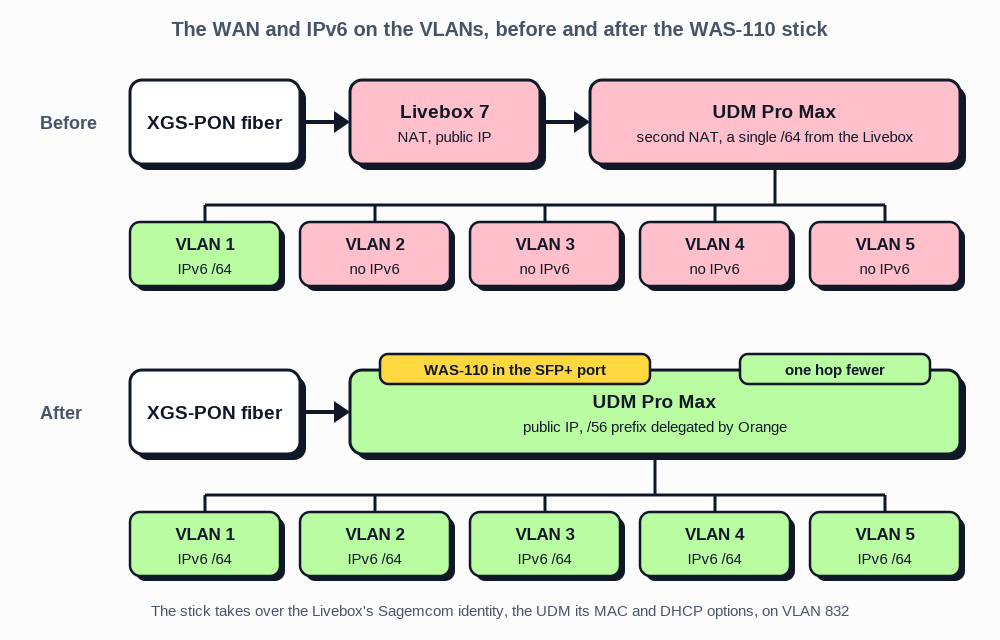
With the Livebox in front of the UDM, I had double NAT, and the public IP stayed on Orange’s box. Above all, I wanted IPv6 addressing on all my VLANs. But the Livebox only left the UDM a /64 prefix, and that setting can’t be changed on the box. Each VLAN needs its own /64, so only one of my VLANs could get IPv6. With the public IP directly on the UDM, Orange delegates a /56 prefix, which is 256 /64 prefixes to split across the VLANs.
The hardware
- A WAS-110 stick, the FiberMall version built for Ubiquiti.
- The 8311 community firmware v2.8.3 (https://github.com/djGrrr/8311-was-110-firmware-builder).
- A UniFi Dream Machine Pro Max, with a U5G Max as a 4G backup.
The steps
- Read the PON serial number, the hardware and software versions, the MAC address and the DHCP authentication options from the Livebox.
- Update the stick’s firmware, then clone the Livebox’s Sagemcom identity onto it.
- Configure the WAN in UniFi: VLAN 832, cloned MAC, CoS priority 6, DHCPv4 options 60, 77 and 90, DHCPv6 options 11, 15 and 16, and /56 prefix delegation.
- Cut over with 4G as a backup. On my side, the outage only lasted a few seconds.
- Enable IPv6 with prefix delegation on each VLAN.
For the WAN configuration, the values take this shape:
VLAN ID          : 832
MAC              : AA:BB:CC:DD:EE:FF   (Livebox MAC, example)
CoS              : 6
DHCPv4 option 60 : <value read from the Livebox>
DHCPv4 option 77 : <value read, without the "+">
DHCPv4 option 90 : <authentication string>
DHCPv6 11/15/16  : <values read from the Livebox>
Prefix delegation: /56
These options present the UDM to Orange as a Livebox:
- Option 60 (vendor class) announces the box’s manufacturer, and option 77 (user class) its Livebox profile.
- Option 90 carries the authentication string, derived from the connection login.
- Options 11, 15 and 16 are their DHCPv6 counterparts: authentication, user class and vendor class.
- CoS 6 is the 802.1p priority Orange expects on DHCP packets.
The pitfalls
The VLAN in the stick. You have to enable “Fix VLANs” and set the Internet VLAN to 832. Before these two settings, Orange didn’t answer at all.
DHCP option 61. UniFi encodes this option as ASCII text instead of bytes, and Orange then ignores the requests. You have to remove it.
Option 77. UniFi adds the length byte itself. So don’t add the “+” you see in guides written for the Livebox.
SSH on the UDM. After a few failed password attempts, SSH access locks for a while. Better to know that before piling up attempts during the cutover.
The result
The public IP lands directly on the UDM. Ping to 1.1.1.1 sits around 10 ms, with one hop fewer than when the Livebox was in front. Every VLAN has a public IPv6 address, and Home Assistant is still reachable.
These are point-in-time measurements on a single setup, not a benchmark. I don’t have enough hindsight yet to talk about stability over several months. The 8311 firmware is also a community project, and Orange doesn’t support this setup.