
A business app I build offers a handwritten notes pad on tablets. Its users work in the field, often where the network is bad or simply gone, and they write with a stylus the way they would on a paper pad. Two requirements that normally call for a native app.
I didn’t go native. A PWA (an installable web page, served by a plain Rails app) does the job, provided you respect three realities of the device: there isn’t always a network, the stylus is a real stylus, and it spits out data far faster than you’d expect. Each one hides a trap the tutorials never mention.
The deploy that wipes the offline notes
Offline-first relies on a service worker that caches pages and serves them back when the network drops. The pattern is well known. You name a cache, store the visited pages in it, and on the next deploy you rename the cache to invalidate the old content.
That very rename creates a silent failure. When you bump carnet-v2 to v3, the new service worker’s activate event deletes the old cache. Everything in it goes too, including the notes the user had already viewed offline. The result is that someone installs the update in the morning at the depot, heads out to the field, loses the network, opens their notes… and lands on the “no connection” page. Their data existed; we had just thrown it away.
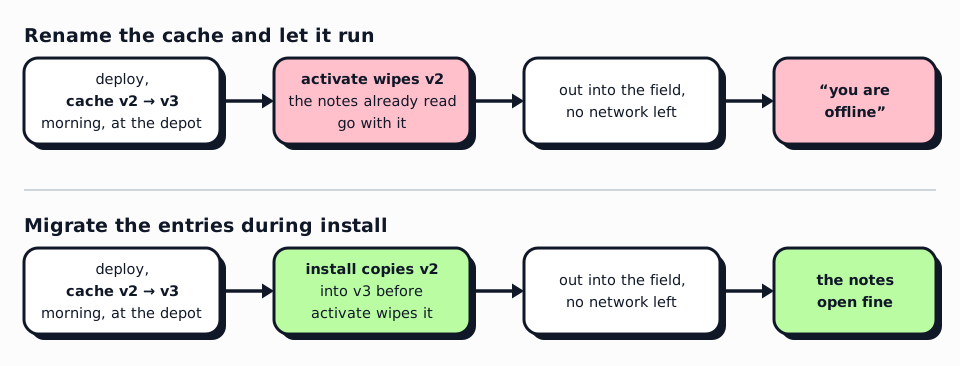
The fix is to migrate the entries from the old cache into the new one before activate does its housekeeping:
self.addEventListener("install", (event) => {
  event.waitUntil((async () => {
    const cache = await caches.open(CACHE_NAME)
    // Carry entries over from any previous cache version before `activate`
    // prunes it. Renaming CACHE_NAME would otherwise wipe already-cached
    // /admin/notes pages, and the offline page relies on them to redirect
    // offline, so a user going offline right after the SW update would land
    // on the dead-end offline page until they revisited notes online.
    for (const name of await caches.keys()) {
      if (name === CACHE_NAME) continue
      const previous = await caches.open(name)
      for (const request of await previous.keys()) {
        if (await cache.match(request)) continue
        const response = await previous.match(request)
        if (response) await cache.put(request, response)
      }
    }
    await cache.add(OFFLINE_URL) // the offline page itself is always refreshed
  })())
  self.skipWaiting()
})
The offline page stops being a dead end along the way: if the notes are cached, a script bounces straight to them instead of announcing a failure.
The stylus that writes “too thick”
For the stroke rendering I use perfect-freehand, which turns a sequence of points into a smoothed, variable-width outline. By default the library simulates pressure from the speed of the gesture: go fast and the line thins, go slow and it thickens.
Great for drawing. Disastrous for handwriting. When you write, you go slow and deliberate, exactly the regime where simulation swells the stroke. The result is pasty letters that don’t match what the hand is doing on screen.
The tablet has a real stylus, which reports real pressure through PointerEvent.pressure. So the right answer is to turn the simulation off and use hardware pressure only, when it is available:
export const FREEHAND_PEN_OPTS = Object.freeze({
  smoothing: 0.45,
  streamline: 0.2,
  // Width comes from real stylus pressure, never from velocity: simulation
  // swelled the stroke at the slow speeds typical of handwriting.
  simulatePressure: false,
  // Little modulation: hard presses made the stroke pasty again.
  thinning: 0.2,
  // Without this, smoothing catches the final point too. See below.
  last: true,
})
With one subtlety: PointerEvent.pressure reads 0.5 when the device reports nothing, mouse and finger included. So once per stroke we check whether any value breaks out of that constant 0.5, and width varies only then.
The line that does not stick to the tip
The symptom was hard to put into words. No visible slowness, no clear stutter, only the sense that the line followed the pen instead of coming out of its tip. So I measured before touching anything, with two scripts replaying real strokes, one for the geometric gap between tip and line, one for the cost of the pipeline in Chromium. Two causes came out.
The tip was being filtered. The streamline option smooths each point toward the previous one, and without last: true it smooths the final one too, the point meant to sit under the pen. Over 67 real strokes, 3497 samples, the rendered tip trailed by 6.1 px on average and up to 75.8 px on fast gestures. One boolean brings the gap to zero and leaves the smoothing to the trail behind it.
The thread froze at the worst moment. Every pointerup queued a bitmap snapshot of the note in requestIdleCallback. Since the next letter starts about a hundred milliseconds later, the callback fired mid-stroke: every outline recomputed, a 2D canvas filled, a WebP encoded synchronously. The line froze for 150 to 950 ms, then jumped to the pen.
The fix owes nothing to an algorithm. The snapshot waits for a second and a half of stillness, never fires during a gesture, and encodes off the main thread; the live stroke left the SVG holding the persisted ones, where rewriting it every frame forced the whole scene to be recomputed, for a dedicated canvas in desynchronized: true. The worst frame while writing went from 199 to 34 ms on a light note, and from 935 to 21 ms on a note of 370 strokes.
That leaves the raw sample rate. At 500 Hz most samples land less than a pixel from the previous one, adding no visible detail. Screen-space distance filtering drops them.
const dx = ev.clientX - this.lastSampleClient.x
const dy = ev.clientY - this.lastSampleClient.y
if (dx * dx + dy * dy < MIN_SAMPLE_DIST_SQ) continue // < 1.2 px: drop it
this.lastSampleClient = { x: ev.clientX, y: ev.clientY }
Distance is measured in screen pixels, not document coordinates, so density holds at any zoom, and we compare the squared value to avoid a root per point. The filter dedupes the pointerrawupdate and pointermove events describing the same point along the way.
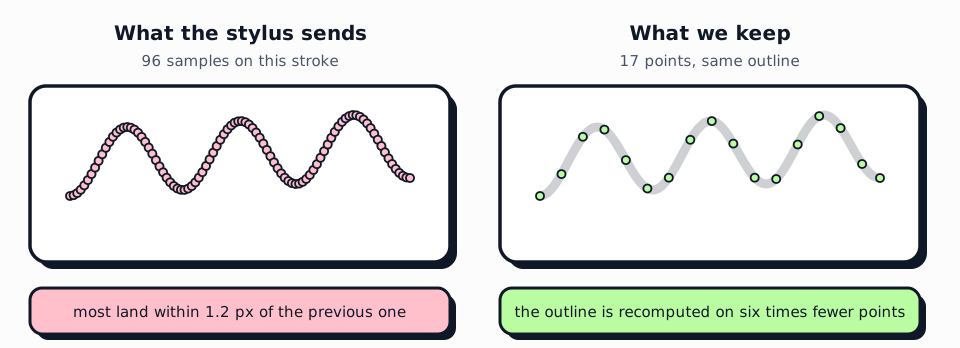
getCoalescedEvents() and getPredictedEvents() were in place long before this diagnosis and had nothing to do with it. The best-practice list was fully ticked, and the line still came off the tip.
What I take away from it
None of these fixes is sophisticated: a loop, two booleans, a distance comparison. What costs is identifying the right problem. The cache that wipes itself needs a genuinely bad connection, the pasty stroke a real pen in hand, the tip coming off an instrument to measure it. None of that shows up on a MacBook over Wi-Fi during development.
The browser is more than capable of a near-native experience, without the cost of an app to maintain, sign and push through a store. What it asks in return is a test bench that looks like the field: a real tablet, a real pen, and airplane mode.
If this sounds familiar
Offline notebooks, sync that survives a flaky connection, a field app that has to hold up on an iPad that keeps falling asleep: that’s exactly the kind of friction I unblock at SXN Labs. If you have a business use case stuck between “we’d need a native app” and “the web can’t do it”, we can look at what it actually takes.