
All financial figures and client names in this article are fictional. The screenshots show real screens, filled with made-up data.
When you run a company on your own, one question comes up more often than any other. Not “how much did I invoice last month”, not “what’s my yearly revenue”. The real question, the one that decides everything, is: how much am I owed, in total, that I’m going to collect?
Not within a 30 or 90 day window. In total. Everything invoiced and not yet paid, with no time limit, and whatever is overdue clearly flagged.
And the problem was that nothing answered it. My accounting software told me what was invoiced. My CRM what was in the pipe. My bank account what had already landed. Three partial truths, in three different tools, that I had to cross-reference by hand in a spreadsheet on a Sunday evening. Which is to say: never.
So I stitched the pieces back together at the source, inside Argos.
Argos, from CRM to treasury cockpit
Argos is the CRM I built for SXN Labs. It started out managing contacts, deals and quotes. The latest project was to graft a treasury-tracking layer onto it, with one rule I set for myself: show facts, not predictions. I didn’t want a model guessing my future. I wanted the truth at time T, the kind I can verify line by line.
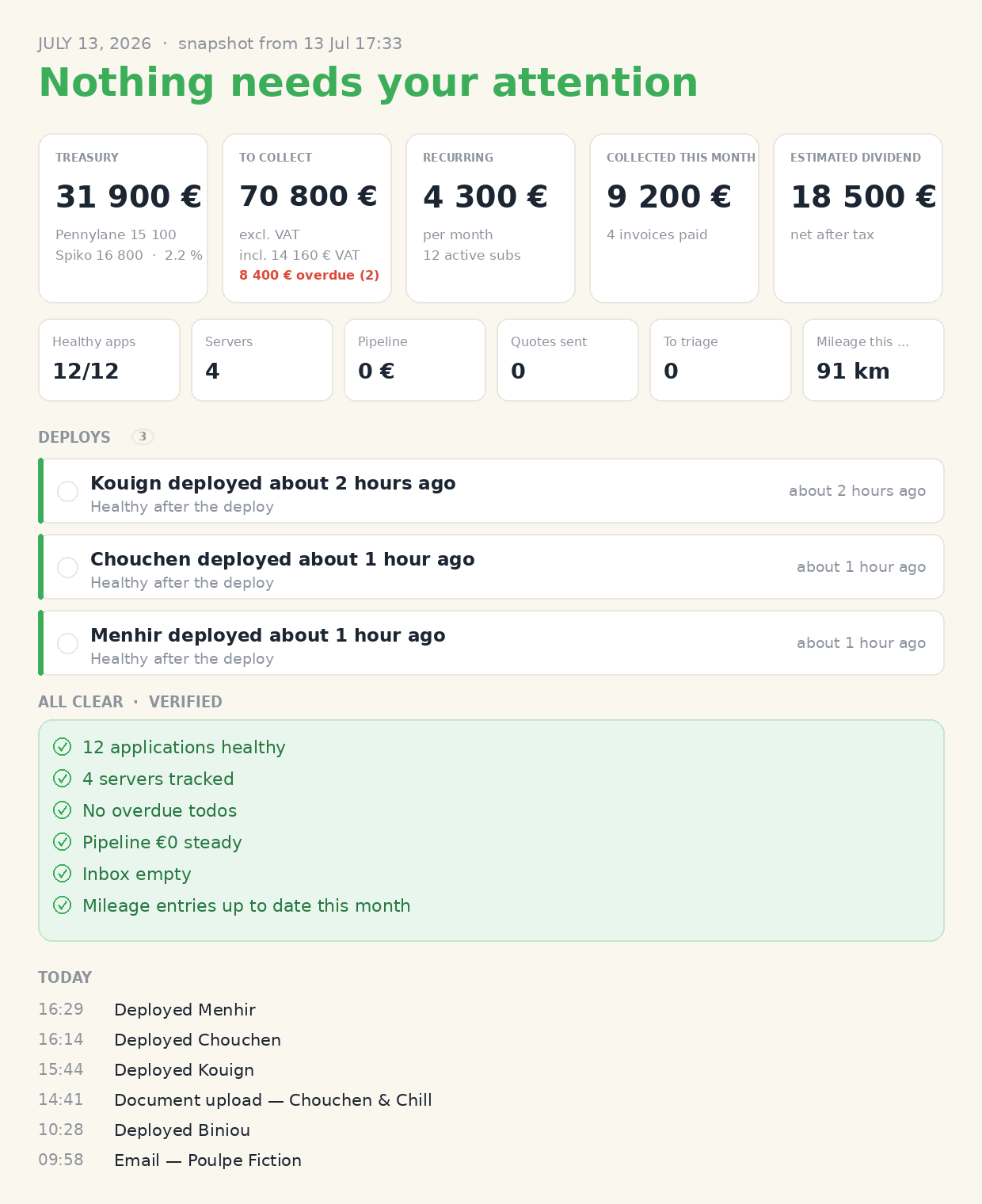
The result is a dashboard whose default state is a sentence I love to read: “Nothing needs your attention.” When something is off, it surfaces it. When everything is fine, it says so, and then it shuts up. At the top of the screen, a handful of numbers, all factual, all up to date, without me entering anything.
Under that calm surface, there are three small technical challenges I find interesting.
All the pending cash, at once
The central number is “to collect”: the sum of every invoice issued and not yet paid. No sliding window, no arbitrary horizon, just the total.
But a raw amount isn’t enough. What I want to see at a glance is the ex-VAT figure (what’s actually mine), the VAT share (which I’m only holding for the tax office), and above all what’s overdue. A client who has owed 8,400 € for ten days is not the same piece of information as a client who has until the end of the month to pay me. The first calls for a reminder, the second doesn’t.
Argos computes that ex-VAT / incl-VAT / overdue split from Pennylane invoices. And this is where using Pennylane as both bank and accounting software pays off. No bank reconciliation to do, since payments are natively matched to invoices, transactions arrive already categorized. I consume the data as-is, I don’t reclassify anything by hand.
Two accounts, one treasury
My treasury lives in two places. Pennylane for day-to-day banking. Spiko for idle cash, parked in tokenized money-market funds that earn a little every day.
Total treasury is therefore the sum of the two pools. Because they are physically distinct, a bank account on one side and fund shares on the other, there’s no risk of counting the same euro twice. And if one of the two sources goes down, the system falls back cleanly on the other rather than showing a phantom balance.
A small anecdote for anyone who has integrated an API before: Spiko returns a lovely 403 from Cloudflare if you don’t send a browser User-Agent. The classic “your urllib is blacklisted by default”. Five minutes of confusion, one header, and you move on.
And everything else, in one place
Once cash-to-collect and treasury were in place, I added the other facts that weigh on a small company: monthly recurring revenue, what was actually collected this month, and an estimate of the dividend I could pay myself, net of tax. Always the same logic: observed numbers, not promises.
And because Argos isn’t only a financial tool, the same screen also aggregates the operational side: are my deployed applications healthy, how many servers are tracked, which deploys happened today, is my inbox up to date, are my mileage entries logged. Finance, ops and admin, in a single glance. All crowned by that famous “nothing needs your attention” when the checklist is green.
The twist: less interface, not more
Here’s the counter-intuitive part.
The natural tendency, when you add data to a tool, is to pile on screens, charts and filters. I did the opposite. I shrank Argos’s interface surface to the minimum, and I now drive it almost entirely through MCP.
For the uninitiated, MCP (Model Context Protocol) lets you expose an application’s functions as tools an assistant can use. Concretely, Argos exposes tools like list_deals, create_quote, get_metrics_summary, daily_briefing. As a result, I barely click anymore. I talk to my CRM. “Summarize the treasury”, “which quotes are signed but not yet invoiced”, “create a deal for this prospect”. The answer comes back, or the action happens, without me opening a single page.
What I understood while building this is that for a tool I use alone, the most efficient interface isn’t a pretty web page. It’s a good, well-described API that an AI can operate on my behalf. The graphical UI becomes the exception, reserved for the moments when I actually want to see something.
A word on trust, because the question always comes up: this whole financial pipeline is read-only. No invoice creation, no transfer, no automated movement of money. The system reads, aggregates, displays. It never touches the money. It’s a sensor, not a hand.
Cash in sight, without going to look
One last detail remained, and it might be the most pleasant one day to day.
A dashboard, however accurate, is useless if it’s buried in a tab I open once a week. So I took it off the screen. I put a small e-ink display, a TRMNL, on the shelf in my office. It cycles the Argos Cash screen (to sign, to invoice, to collect, treasury, overdue invoices, collected this month) alongside other CRM views and more general ones: the weather, a photo, and the rest.
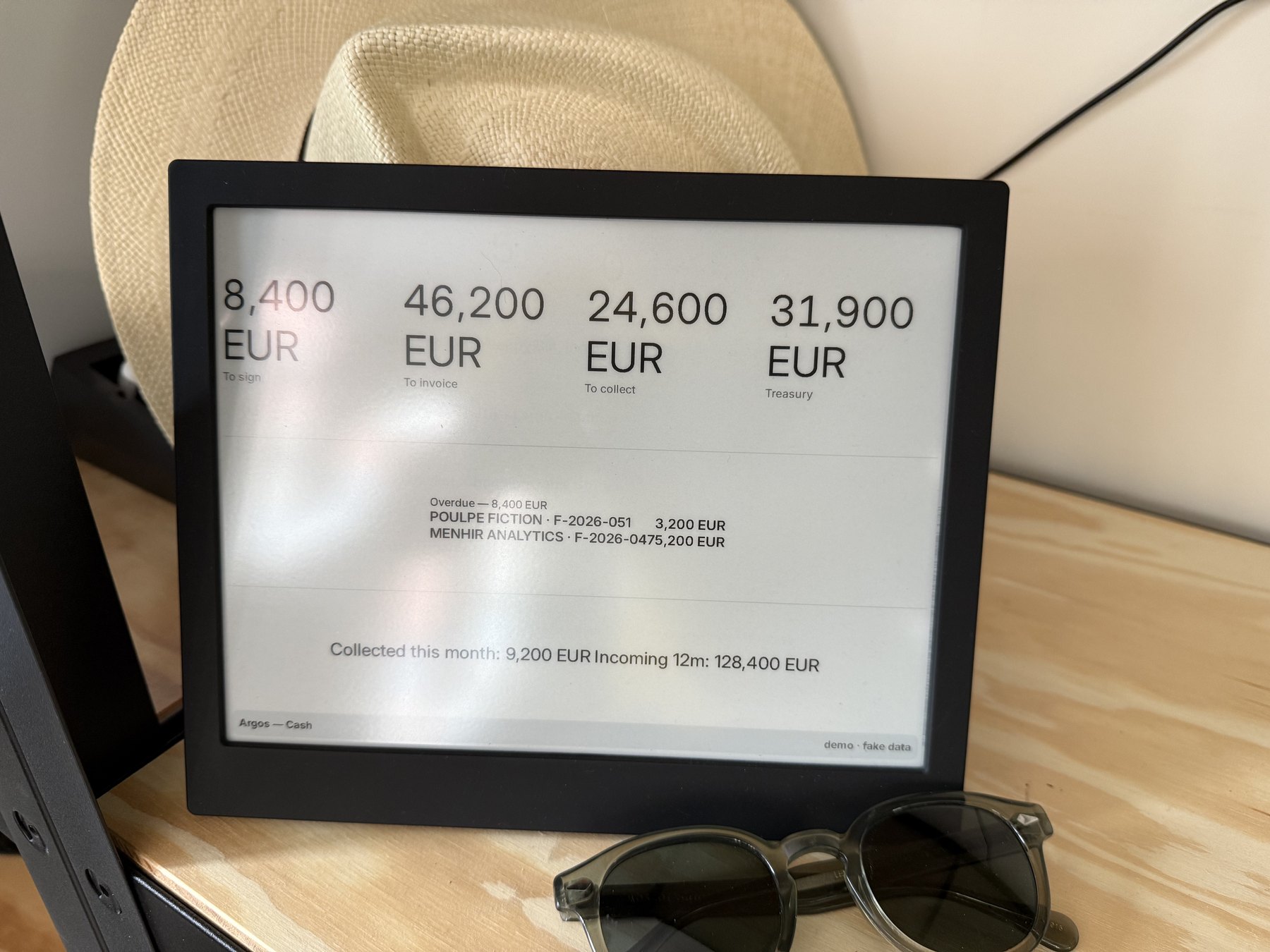
The effect is surprisingly strong. Financial information is no longer something I go and fetch: it drifts through my field of view several times a day, between the weather and a photo, next to the hat and the sunglasses. I look up, and often enough, I know where I stand. No notification, no app to open. Just a calm number, updated on its own, in black and white on electronic paper.
What I take away
Building this thing for myself confirmed a conviction: the best tools you can make are often the ones you use first yourself, with real needs and real irritations. Argos’s treasury tracking was born from my own question, the one about the cash I’m owed. And that demand, the kind that lets nothing slide, ends up seeping into the product I offer my clients.
Three ideas worth keeping: stitch the data back together at the source instead of in a spreadsheet, show verifiable facts rather than predictions, and accept that the best interface is sometimes the one that doesn’t exist.
Next time you wonder how much you’re really owed, ask yourself another question: does your tool answer you at a glance, or do you still have to open a spreadsheet on a Sunday evening?